
3.6. Updates
Springe zu:
No content available.
Herzlich Willkommen!
Wir freuen uns, Ihnen unseren NCTI premium/CRM Client vorstellen zu dürfen.
Bei der Entwicklung des CTI-Clients haben wir uns von einer möglichst einfachen Bedienung leiten lassen, ohne auf umfangreiche Funktionalität und Integration von CRM-Systemen zu verzichten. Mit dem NCTI premium/CRM Client sind beispielsweise Präsenzstati, Chat-Funktion und die Einbindung diverser CRM-/ERP-Systeme realisiert worden.
Wir wünschen Ihnen viel Freude bei der Nutzung!
Mit dem CTI (Computer-Telefonie-Integration)-Client nutzen Sie Ihren Computer als Fernbedienung für Ihr Tischtelefon. Wir bieten Ihnen zwei Lizenzvarianten, eine mit und eine ohne CRM-Anbindung. Es lassen sich zusätzlich CRM- und ERP-Systeme in den Client integrieren.
Mit dem NCTI premium/CRM Client lassen sich eine Vielzahl an Customer Relationship Management (CRM)-Tools direkt in die Telefonanlage integrieren. Die hieraus verkürzten Arbeitsprozesse und das vereinfachte Call Management führen zu höherer Produktivität und Effizienz am Arbeitsplatz.
Dieses Handbuch dient dazu, Ihnen einen detaillierten Einblick in die Installation und Nutzung des NCTI premium/CRM Clients zu geben, um Ihnen das Telefonieren so angenehm und einfach wie möglich zu gestalten.
Änderungen bleiben vorbehalten
Version 3 / 02.2026 (DE)
Um den NCTI premium/CRM-Client nutzen zu können, ist eine Serverinstallation beim Kunden erforderlich. Dieser Server wird von der NFON AG gestellt jedoch nicht gehosted. Die Serverinstallation und die Konfiguration werden von der NFON AG durchgeführt.
Der NCTI premium Client benötigt für die Kommunikation das uaCSTA-Protokoll. Daher ist der Client mit nur ausgewählten Geräten kompatibel.
| Art | Icon | Beschreibung |
| Hinweis |  | Wichtige Informationen und Hinweise, die Sie unbedingt beachten müssen. |
| Tipp |  | Nützliche Tipps, die Ihnen zusätzliche Informationen bieten. |
| Handlungsschritt | - | Wird mit einem Spiegelstrich markiert |
| Ergebnis einer Handlung | ⇒ | Wird mit einem Pfeil markiert |
| Aufzählung/-listung | | Wird mit einem Punkt markiert |
Hier finden Sie jeweils eine Quick Start-Anleitung zur Konfiguration sowie zur initialen Bedienung und zum Einstieg des NCTI premium Clients:
Aufgrund der Abkündigung der Betriebssysteme “Windows XP“ vom 08. April 2014 und "Windows 7" vom 14. Januar 2020 sowie des Windows-Servers 2003 im Juli 2015, wird Nutzern hierfür kein offizieller Support und keine Updates mehr zur Verfügung gestellt. Somit ist der NCTI premium/CRM Client weder, wie im Quick Start Guide "Bedienung und Einstieg" aufgeführt, mit Windows XP, Windows 7 noch mit Windows Server 2003 offiziell freigegeben.
Des Weiteren empfehlen wir aus Sicherheitsgründen keine Nutzung mit Windows Vista in Verbindung mit NCTI premium/CRM, da TLS 1.2 unter älteren Windows-Versionen wie Windows Vista oder XP nicht zur Verfügung stehen. Laut BSI Empfehlung (Bundesamt für Sicherheit in der Informationstechnik) gilt TLS 1.2 als der Mindeststandard für die Transportverschlüsselung mti TLS (Transport Layer Security).
Client Voraussetzungen
Der NCTI premium/CRM-Client ist für folgende Betriebssysteme geeignet (sowohl 32- als auch 64-Bit):
Windows 10
Windows 11
Windows Server 2022
Der NCTI premium/CRM-Client funktioniert mit folgenden von NFON zertifizierten Systemtelefon-Herstellern:
 snom
snom
Yealink
Poly
Panasonic
Server Voraussetzungen – Small Single Site
Diese Mindestanforderungen an den Server gelten für die folgenden Parameter:
Bis zu 30 Trunks
Bis zu 500 Anrufe pro Stunde
Bis zu 50 Nebenstellen/Benutzer
Unterstützte Betriebssysteme (nur 64-bit):
Windows Server 2022*
Windows Server 2019
Windows 10
Windows 11*
Hinweis: NCTI Premium wird auf einem Windows-Server, der auch als Windows Domain Controller konfiguriert ist, nicht unterstützt.
* Hinweis: Windows 11 und Windows Server 2022 werden nicht unterstützt, wenn sie in Verbindung mit NVMe-Laufwerken verwendet werden. Weitere Informationen finden Sie hier.
Mindestanforderungen an die Hardware:
64-Bit AMD- oder Intel-Prozessor
Mindestens 4 GB Arbeitsspeicher
20 GB freier Festplattenspeicher
Netzwerkadapter mit Anschluss an ein TCP/IP-Netzwerk (nicht drahtlos)
Auch virtuelle Umgebungen werden unterstützt, z. B. VMware oder Hyper-V.
Hinweis: Eine kleine Serverinstallation kann mit anderen Anwendungen auf einem gemeinsam genutzten Server koexistieren. Wenn der Rechner jedoch Leistungsprobleme hat, sollte ein dedizierter Server verwendet werden.
Server Voraussetzungen – Medium Multi Site
Diese Mindestanforderungen an den Server gelten für die folgenden Parameter:
Bis zu 150 Trunks über mehrere Standorte
Bis zu 2000 Anrufe pro Stunde
Bis zu 400 Nebenstellen/Benutzer
Unterstützte Betriebssysteme (nur 64-bit):
Windows Server 2022*
Windows Server 2019
Windows 10
Windows 11*
Hinweis: NCTI Premium wird auf einem Windows-Server, der auch als Windows Domain Controller konfiguriert ist, nicht unterstützt.
* Hinweis: Windows 11 und Windows Server 2022 werden nicht unterstützt, wenn sie in Verbindung mit NVMe-Laufwerken verwendet werden. Weitere Informationen finden Sie hier.
Mindestanforderungen an die Hardware:
64-Bit AMD- oder Intel-Prozessor
Mindestens 4 GB Arbeitsspeicher
20 GB freier Festplattenspeicher
Netzwerkadapter mit Anschluss an ein TCP/IP-Netzwerk (nicht drahtlos)
Auch virtuelle Umgebungen werden unterstützt, z. B. VMware oder Hyper-V.
Hinweis: Für mittlere Serverinstallationen ist ein dedizierter Server erforderlich.
Server Voraussetzungen – Large Multi Site
Diese Mindestanforderungen an den Server gelten für die folgenden Parameter:
Bis zu 300 Trunks über mehrere Standorte
Bis zu 4000 Anrufe pro Stunde
Bis zu 1000 Nebenstellen/Benutzer
Die Anrufhistorie muss auf 14 Tage beschränkt sein.
Unterstützte Betriebssysteme (nur 64-bit):
Windows Server 2022*
Windows Server 2019
Windows 10
Windows 11*
Hinweis: NCTI Premium wird auf einem Windows-Server, der auch als Windows Domain Controller konfiguriert ist, nicht unterstützt.
* Hinweis: Windows 11 und Windows Server 2022 werden nicht unterstützt, wenn sie in Verbindung mit NVMe-Laufwerken verwendet werden. Weitere Informationen finden Sie hier.
Mindestanforderungen an die Hardware:
64-Bit AMD- oder Intel-Prozessor
Mindestens 8 GB Arbeitsspeicher
20 GB freier Festplattenspeicher
Netzwerkadapter mit Anschluss an ein TCP/IP-Netzwerk (nicht drahtlos)
Auch virtuelle Umgebungen werden unterstützt, z. B. VMware oder Hyper-V.
Hinweis: Für große Serverinstallationen ist ein dedizierter Server erforderlich.
Microsoft Components
.NET 4.5 Framework (required and shipped with software).
.NET 4.8 Framework from V3.2 (required and shipped with software).
Microsoft Visual C++ 2015-2019 Redistributable
Note: NCTI Server makes use of a lightweight embedded database.
Version
Die aktuellste Version Ihres Clients wird Ihnen angezeigt, wenn Sie auf der Administrationsoberfläche unter dem Menüpunkt Über > Versionen auswählen.
)
No content available.
No content available.
Um auf Ihrem Rechner den NCTI premium/CRM Client betreiben zu können, sind folgende Voraussetzungen notwendig:
Eine Internetverbindung muss vorhanden sein
Ein IP fähiges Telefon entsprechend (siehe Kompatibilität)
Ihre Kundennummer, Nebenstellennummer und Voicemail-PIN ist verfügbar
Das Systemtelefon Ihrer Nebenstelle ist im Adminportal als Primärgerät zugewiesen
Für das Systemtelefon Ihrer Nebenstelle muss im Serviceportal uaCSTA aktiviert sein
Im Adminportal muss für die Nebenstelle die CTI-Option „NCTI premium“ oder „NCTI premium CRM" ausgewählt sein
Weitere Informationen zu den Systemvoraussetzungen finden Sie unter NCTI Clients für Windows.
No content available.
Für die Installation des NCTI premium-Servers wenden Sie sich bitte an unseren Vertrieb. Da der NCTI premium Client ein 3rd Party Client ist, muss eine Installation des Servers lokal durchgeführt werden.
Für die lokale Installation des Servers enstehen Ihnen einmalig Kosten.
Nachfolgend wird Ihnen hier die Installationsanleitung für den NCTI premium Client dargestellt.
Starten Sie den Installationsprozess durch einen Doppelklick auf die Setup-Datei.
Klicken Sie auf Weiter.
)
Klicken Sie auf Annehmen, um die Lizenz zu bestätigen.
)
Die Installation des Clients kann einige Minuten in Anspruch nehmen.
)
Klicken Sie auf Fertigstellen, um die Installation abzuschließen.
)
Bitte beachten Sie, dass der Port TCP 21050 auf Ihrer Firewall für den Client freigegeben werden muss. Kontaktieren Sie hierzu Ihren systemtechnischen Ansprechpartner.
Nachdem die Installation abgeschlossen ist, finden Sie das NCTI premium-Symbol unten in ihrer Menüleiste.
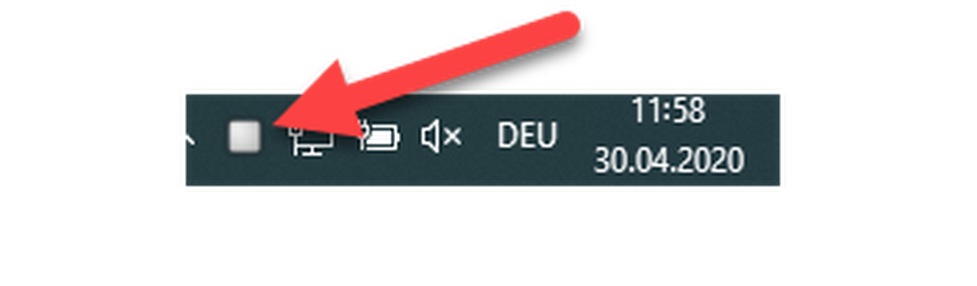
Die graue Farbe im Kästchen bedeutet, dass der Client nicht mit dem Tischtelefon verbunden ist.
Wie Sie Ihren Client mit dem Telefon verbinden, lesen Sie unter Einrichtung der Nebenstelle.
Der NCTI premium Client ist so konfiguriert, dass er bei jedem Neustart des Rechners automatisch startet. Der erfolgreiche Start des Clients wird Ihnen durch das grüne NCTI premium Symbol in der Menüleiste signalisiert.
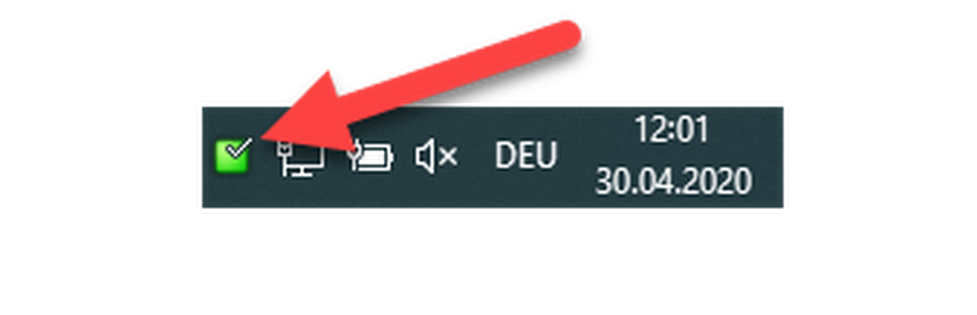
Um Ihren NCTI premium CRM Client mit Ihrem IP-Telefon konfigurieren zu können, müssen Sie das Telefon in der Telefonanlage anlegen. Hierzu beachten Sie bitte folgende Schritte:
-Loggen Sie sich mit Ihrem Benutzernamen und Passwort im Serviceportal an.
-Gehen Sie auf ELEMENTE  ENDGERÄTE und wählen Sie Ihr Telefon aus. Dieses finden Sie durch Eingabe ihrer Nebenstelle im Suchfeld.
– Wählen Sie hier die vom NCTI Premium unterstützte (neueste) Firmware für Ihr Telefon aus.
– Wählen Sie den passenden Standort aus. Hierbei wird bestimmt, dass sich das Telefon die richtigen Daten vom Server herunterladen kann. Im Standort müssen die uaCSTA-Einstellungen hinterlegt sein. Alternativ können diese auch direkt im Endgerät hinterlegt werden.
)
Wenn die uaCSTA-Einstellungen bereits im Standort eingetragen sind, ist die Einrichtung des Endgeräts abgeschlossen.
Andernfalls gehen Sie bitte wie folgt vor:
– Loggen Sie sich als Administrator in Ihre Cloud Telefonanlage ein.
– Öffnen Sie den Reiter "Standort".
– Öffnen Sie den betreffenden Standort per Doppelclick
– Scrollen Sie zum Punkt uaCSTA weiter
– Geben Sie die IP-Adresse des CTI-Servers an wie bspw. 192.168.30.145.
– Tragen Sie als Port 6060 ein.
– Wählen Sie als Protokoll UDP oder TLS aus.
– Bei einer TLS-Verbindung blocken Sie bitte Port 21050 und fügen Sie Port 21051 der IP-Adresse hinzu (z. B. 127.0.0.1:21051)
– Tragen Sie das Passwort des CTI-Servers ein.
– Klicken Sie auf Speichern, um die Einstellungen zu übernehmen.
To connect the CTI Client with your telephone, the latter must be recognised as a primary device.
Überprüfen Sie, ob das ausgewählte Telefon Ihrer Nebenstelle als Primärgerät zugewiesen ist und korrigieren Sie den Haken gegebenfalls.
– Gehen Sie auf Ziele und geben Ihre Nebenstellennummer in das Suchfeld ein.
– Durch Doppelklick gelangen Sie in die Einstellungen Ihrer Nebenstelle. Überprüfen Sie unter Endgeräte, ob Ihr Telefon bereits als Primärgerät ausgewählt ist, andernfalls setzten Sie dort einen Haken.
– Klicken Sie auf Speichern.
⇒Die Einstellungen werden jetzt übernommen und der NCTI premium / CRM Client kann sich mit Ihrem Telefon verbinden.
Um Ihrem NCTI premium Client eine gültige Lizenz zuweisen zu können, muss diese im Serviceportal hinterlegt werden. Hierzu beachten Sie bitte folgende Schritte:
Unter Administration/Profil muss die CTI Option auf "An" eingestellt sein, damit Sie mit dem CTI Client arbeiten können. Ist dies nicht der Fall, kontaktieren Sie Ihren systemtechnischen Ansprechpartner, um diese Funktion für Sie freizuschalten.
– Sobald die CTI-Option aktiviert ist, melden Sie sich mit Ihrem Benutzernamen und Passwort beim Serviceportal an.
)
– Gehen Sie zu ZIELE und geben Ihre Nebenstellennummer in das Suchfeld ein.
– Durch Doppelklick gelangen Sie in die Einstellungen Ihrer Nebenstelle. Überprüfen Sie unter KONFIGURATION, ob im Feld "CTI" bereits eine entsprechende Lizenz ausgewählt ist. Falls nein, wählen Sie mit Klick auf das Dropdown-Feld Ihren NCTI Premium Client mit oder ohne CRM-Anbindung aus.
)
– Klicken Sie auf Speichern.
⇒ Die Einstellungen werden übernommen und Sie haben Ihre Nebenstelle für die Nutzung des NCTI Premium/CRM Clients lizenziert.
No content available.
– Um in die Konfigurationseinstellungen des NCTI premium/CRM Clients zu gelangen, klicken Sie mit einem Rechtsklick auf das graue NCTI Premium-Symbol in der Menüleiste Ihres Desktops.
)
– Klicken Sie auf Konfiguration.
⇒ Im Anschluss öffnet sich das Konfigurationsmenü.
)
Um den Client mit Ihrem Telefon zu verbinden, geben Sie nun folgende Daten ein:
– Server: IP-Adresse (z. B. 192.168.30.145) oder Domain-Name Ihres Servers
– K-Nummer: Ihre persöhnliche Kunden-Nummer (z. B. K1234)
– Nebenstellen-Nummer: Ihre persönliche Nebenstelle (z. B. 123)
– VoiceMail-PIN: Ihr persönlicher Voicemail-PIN
– Sobald Sie Ihre Daten eingegeben haben, drücken Sie abschließend auf Speichern.
)
⇒ Der Client ist jetzt mit Ihrem Telefon verbunden und das Symbol in der Menüleiste leuchtet grün.
)
Unter Nutzer-Interface können Sie individuelle Einstellungen für Ihren Client vornehmen. Im Folgenden wird hierauf genauer eingegangen.
– Wählen Sie die gewünschte Sprache aus.
– Unter Hot Keys können Sie festlegen, mit welchen Tastenkürzeln Sie Anrufe annehmen, wählen und auflegen können.
)
In dem Menü Wählmethoden haben Sie die Möglichkeit, das Anwählen von Rufnummern individuell auf Sie angepasst zu konfigurieren.
– Sie können verschiedene Wählmethoden aktivieren. Die Einstellungen werden erst übernommen, wenn Sie nach einer Änderung auf Speichern klicken.
– Fügen Sie Anwendungen wie z. B. Outlook hinzu, aus welchen Sie nach Hinzunahme bequem direkt heraus wählen können (mehr dazu im Punkt Integrationen).
– Legen Sie die minimale und die maximale Länge einer Rufnummer fest, die von dem Client als Rufnummer erkannt werden soll. Wir empfehlen Ihnen an dieser Stelle als minimale Länge 5 und als maximale Länge 20 einzutragen.
)
Im Folgenden wird näher auf die unterschiedlichen Wählmethoden eingangen.
Wenn Sie "Wählen aus der Zwischenablage" aktiviert haben, erscheint nachdem Sie eine Nummer markiert und in die Zwischenablage kopiert haben, ein Popup bei Ihrem Client Symbol.
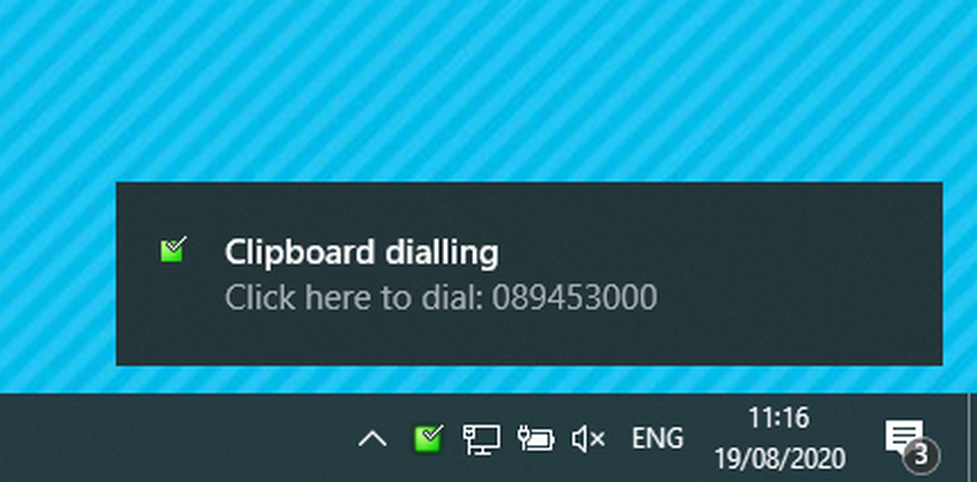
Wenn Sie auf das Popup Fenster mit Ihrer Maus klicken, baut der Client direkt eine Verbindung zu der in die Zwischenablage kopierten Rufnummer auf.
-Klicken Sie nachdem Sie das Feature ausgewählt haben auf Speichern, damit der Client Ihre Konfiguation übernimmt.
Dieses Feature ermöglicht es Ihnen, Rufnummern direkt aus einer Anwendung wie z. B. Outlook heraus zu wählen. Es wird exemplarisch die Anbindung an Outlook dargestellt.
Wählen Sie den Anwendungstyp, aus dem Sie wählen möchten.
)
Ziehen Sie das Fadenkreuz in das Feld einer Anwendung, welches die Rufnummer beinhaltet, und lassen Sie die Maustaste los.
Klicken Sie auf Weiter.
)
– Klicken Sie auf Schließen, um Ihre vorgenommenen Änderungen zu sichern.
)
Sie können ab sofort aus der Anwendung heraus Rufnummern wählen. Öffnen Sie hierfür einfach einen Kontakt aus Outlook und klicken Sie in das Feld, indem die Nummer steht.
)
Wenn Sie auf das Telefonsymbol klicken, baut der Client den Anruf zu der gewünschten Rufnummer auf.
-Klicken Sie nachdem Sie das Feature ausgewählt haben auf Speichern, damit der Client Ihre Konfiguation übernimmt.
Je nach Anwendung kann es sein, dass ein Neustart des PCs erforderlich ist, damit aus der entsprechenden Anwendung heraustelefoniert werden kann.
Wenn Sie "Focus Dialing" aktiviert haben, können Sie Rufnummern aus editierbaren Feldern heraus direkt wählen.
Sie können ab sofort aus einem Feld heraus Rufnummern wählen.
– Klicken Sie hierfür einfach in das gewünschte Feld.
– Im Anschluss wird das Feld durch einen gelben Rahmen markiert.
– Um die Rufnummer zu wählen, klicken Sie auf das Telefonsymbol.
)
-Klicken Sie nachdem Sie das Feature ausgewählt haben auf Speichern, damit der Client Ihre Konfiguration übernimmt.
Der NCTI premium/CRM Client verfügt über eine TAPI-Schnittstelle. Mit Hilfe dieser Schnittstelle lassen sich eine Vielzahl von internen Datenbanken mit dem Client verknüpfen.
Unter dem Punkt Ereignisse lassen sich Aktionen einstellen, die Ihr Call Management übersichtlicher und effizienter gestalten sollen.
)
Standardereignisse
Hier haben Sie die Möglichkeit für die Szenarien "beim Klingeln", "im Gespräch" und "Ausgehend" zu wählen, ob sich das Telefonfenster öffnen soll.
)
Hierdurch werden Ihnen die Nummer und ggf. Kontaktdaten des Anrufers bereits während des Eingangs eines Anrufes angezeigt.
)
Individuelles Ereignisse
Wenn Sie individuell ein Ereigniss anlegen möchten, klicken Sie bitte auf "Hinzufügen".
Sie haben z. B. die Möglichkeit, ein Web-basiertes CRM-Tool wie bspw. salesforce.com in Ihren CTI Client zu integrieren. Dabei erfolgt die Integration über ein Internet-Browser-Fenster, das sich öffnet, wenn Sie einen Anruf bekommen. Falls Ihr CRM-Tool eine URL mit bestimmten Parametern liefern kann, können Sie diese Parameter durch Codes ersetzen, um bei eingehenden oder ausgehenden Anrufen die Rufnummer oder den Namen direkt an das CRM-Tool zu übermitteln und darzustellen. Einmal konfiguriert, können Sie jederzeit darauf zugreifen.
Beispiel: Sie nutzen Google als CRM-Tool.
Programm:
Wählen Sie als erstes den Browser in Ihrer Programmliste aus.
Parameter:
Um das Suchergebnis für "Wort" bei Google anzeigen zu lassen, lautet die URL:
"http://www.google.com/search?q=Wort"
Um Google nun als Ihr CRM-Tool zu nutzen, müssen Sie folgende URL eingeben:
"http://www.google.com/search?q=%Call\CallerContact\Tel%"
Wie Sie sehen können, wurde "Wort" durch "%Call\CallerContact\Tel%" ersetzt. Bei späteren Anrufen wird dann „%Call\CallerContact\Tel%“ durch die Rufnummer des Anrufers ersetzt.
)
– Klicken Sie mit der rechten Maustaste auf das NCTI Premium-Symbol im Tray und wählen Sie den Menüpunkt "Konfiguration".
⇒ Daraufhin erscheint das Konfigurationsfenster.
)
– Klicken Sie im Konfigurationsfenster auf den Menüpunkt "Versionen" unter "Über".
If a new version is available, click the Download button in the configuration window to download the latest version of the NCTI Premium.
As soon as the latest NCTI premium version has successfully uploaded, please press the button Update. The user planning to install the program must have the administration rights to the computer.
Subsequently, the installation process starts. Follow the instructions displayed on your screen to install the latest NCTI premium version.
Your NCTI premium version is now up to date.
No content available.
Mit dem NCTI premium/CRM Client stehen Ihnen eine Vielzahl an Telefonfunktionen zur Verfügung.
– Um das Telefonfenster zu öffnen, klicken Sie mit einem Rechtsklick auf das grüne Symbol des Clients  in der Menüleiste des Desktops.
)
– Wählen Sie Telefonieren.
⇒ Es öffnet sich das Telefonfenster Ihres Clients.
)
Wenn Sie das Telefonfenster geöffnet haben, gelangen Sie durch Rechtsklick oben links im Fenster wieder in das Menü des Clients.
)
Start der Anwendung und Funktionsbereitschaft
– Stellen Sie Netzwerk- und Internetanbindung sicher und starten Sie die Anwendung.
⇒ Die Anwendung startet minimiert in der Taskleiste (in der Regel unterer Bildschirmrand).
⇒ Nach Anmeldung an der Anlage wird der NCTI premium/CRM Client mit einem grünen Symbol in der Taskleiste signalisiert.
Ausgehender Anruf
– Für interne Anrufe die Nummer der Nebenstelle eintippen und Wählen klicken.
– Für externe Anrufe die vollständige Rufnummer eintippen und Wählen klicken.
– Nach Gesprächsende klicken Sie auf Auflegen.
)
Eingehender Anruf
Eingehende Anrufe werden mit dem Telefonfenster auf dem Bildschirm signalisiert.
– Zur Gesprächsannahme entweder auf dem Telefon die Taste klicken oder im Telefonfenster auf Annehmen klicken.
– Nach Gesprächsende auf Auflegen klicken.
)
Wenn Sie sich vor eingehenden Anrufen schützen wollen, können Sie Ihre Verfügbarkeit im Präsenz-Management modifizieren.
Mehr Informationen zu diesem Thema finden Sie unter Präsenz-Management.
Während eines bestehenden Gespräch werden Ihnen in der rechten Hälte des Telefonfensters die Anrufoptionen angezeigt. Im Folgenden werden die Komfortfunktionen im Detail beschrieben.
)
Anklopfen und Makeln (Umschalten)
Wenn Sie bereits ein Gespräch führen und ein zweiter Anruf eingeht, wird Ihnen der zweite Anruf zum Einen durch ein Screenpopup-Fenster rechts unten im Bildschirm angezeigt. Zum Anderen sehen Sie in dem Telefonfenster neben "Aktionen" zwei blaue Pfeile. Mit Hilfe dieser Pfeile können Sie zwischen den Anrufen hin- und herspringen.
Jetzt können Sie durch Klicken auf "Halten" den jeweiligen Anruf auf Halten setzten. Sie erkennen das gehaltene Gespräch anhand von einem gelben Hörer-Symbol. Das aktive Gespräch ist durch ein grünes Hörer-Symbol gekennzeichnet.
Alternativ können Sie den zweiten Anruf annehmen indem Sie auf "Annehmen" klicken. Der vorherige Anruf wird automatisch auf Halten gesetzt.
Um ein Gespräch zu beenden, klicken Sie auf "Auflegen".
Weiterleiten ohne Rückfrage
Nacherfolgreicher Gesprächsannahme haben Sie die Möglichkeit, den Anruf direkt weiterzuleiten.
– Klicken Sie dazu während des Gesprächs auf "Verbinden".
– Geben Sie die gewünschte Rufnummer ein.
⇒ Der Anrufer wird derzeit auf Halten gesetzt.
– Klicken Sie erneut auf "Verbinden" um den Anruf an die gewünschte Nummer weiterzuleiten. Sie können jetzt auflegen.
⇒ Das Gespräch wird direkt weitergeleitet und Ihr Telefon ist wieder „frei“.
Weiterleiten mit Rückfrage und Konferenz
Sie haben ein Gespräch angenommen. Sie möchten den Anrufer jetzt an jemanden vermitteln, vorher aber den Anrufer ankündigen.
– Klicken Sie während des Gesprächs auf "Rückfrage".
– Wählen Sie die Nummer, zu welcher Sie verbinden wollen.
– Nachdem Sie den Anrufer erfolgreich angekündigt haben, klicken Sie während des Gesprächs mit der Zielperson zur Bestätigung auf "Vollständig".
⇒ Nachdem Sie das Gespräch mit dem Rückspracheteilnehmer beendet haben, leitet das Telefon das Gespräch an die Zielperson mit akustischem Signal weiter.
– Um eine Konferenz zu schalten, klicken Sie nachdem beide Gespräche aktiv sind auf "Konferenz". Alternativ können Sie die Konferenz über Ihr Telefon aktivieren.
Durch seine einfache Darstellung verschafft Ihnen das Präsenz-Management einen schnellen Überblick über die Erreichbarkeit Ihrer Kollegen. Durch die unterschiedliche Darstellung der Gesprächstatus, mittels verschiedenfarbiger Symbole, wissen Sie immer wer erreichbar ist.
Sie gelangen zum Präsenz-Management indem Sie in der Menüleiste auf Ihrem Desktop mit Rechstklick auf das Symbol des Clients klicken und den Menüpunkt Präsenzmanagement auswählen.
)
Anschließend wird das Fenster Präsenz-Management angezeigt. Die Oberfläche des Tools ist in verschiedene Bereiche unterteilt, die unterschiedliche Informationen enthalten.
Einzelheiten zum Präsenz-Management-Fensters
Sortieren oder gruppieren Sie Ihre Kontakte nach Abteilung, Richtung, Status, Benutzerstatus, eigener Verfügbarkeit, Agentenstatus, Ort oder Standort. Der NCTI Premium Client übernimmt die Einträge vom Server.
Der Status eines Kollegen wird je nach dessen aktuellen Gesprächszustand durch verschiedene Symbole visualisiert. Hier eine Übersicht der verschiedenen Gesprächsstatus/Symbole:
| Icon | Description |
 | Teinehmer ist verfügbar |
 | Teilnehmer ist offline |
 | Teilnehmer hat die Funktion Do not Disturb (DND) aktiviert |
 | Teilnehmer tätigt einen ausgehenden Anruf |
 | Teilnehmer ist in einem eingegangenen Gespräch |
Status verwalten
Sie haben die Möglichkeit die Verfügbarkeit, welche Ihren Kollegen angezeigt wird individuell anzupassen. Dies ist z. B. von Nutzen wenn Sie sich in einem Meeting befinden und keine internen Anrufe bekommen möchten.
)
Klicken Sie auf das grüne Häkchen neben Ihrem Namen oder Ihrer Durchwahlnummer.
Unter Verfügbarkeit können Sie auswählen, ob Sie verfügbar, in einer Besprechung oder nicht im Büro sind.
⇒Ihre Kollegen sind nun über Ihre Anwesenheitsinformationen informiert und werden Sie nicht unerwartet anrufen.
)
Sie können Ihren Status auch verwalten, indem Sie auf die Aktentasche unter dem Menüpunkt Verfügbarkeit klicken.
)
Erweiterte Funktionen
Wenn Sie mit einem Rechtsklick auf das Symbol im Präsenz-Fenster klicken, haben Sie die Option den ausgewählten Kontakt anzurufen.
Klicken Sie hierfür auf Wählen.
Außerdem besteht die Möglichkeit aus dem Präsenz-Management heraus dem ausgewählten Kontakt eine Chat-Nachricht zu schicken.
Klicken Sie hierfür auf Nachricht senden.
Um das Adressbuch des NCTI premium / CRM Clients zu öffnen, klicken Sie auf das Symbol in der Task-Menüleiste auf Ihrem Desktop.
)
Das Adressbuch ist so strukturiert, dass es falls Sie die CRM Version des Clients nutzen die Kontaktdaten gesondert nach CRM Systemen anzeigt. Somit haben Sie alle Ihre Kontakte aus verschiedenen Datenbanken geordnet in einem Adressbuch integriert.
)
Wählen aus dem Adressbuch
Sie haben außerdem die Möglichkeit Kontakte direkt aus dem Adressbuch heraus anzuwählen.
Klicken Sie mit einem Rechtsklick im Adressbuch auf den gewünschten Kontakt.
Wenn Sie auf Wählen klicken, werden Ihnen die hinterlegten Rufnummern des Kontaktes angezeigt.
Durch Klicken auf die Rufnummer bauen Sie das Gespräch auf.
)
Suchfunktion
Geben Sie in dem Suchfeld den Namen des erwünschten Kontaktes ein.
Dieser wird Ihnen, sofern er in mehreren Datenbanken abgespeichert ist, auch in den unterschiedlichen Kategorien angezeigt.
Über die Anrufliste können Sie Ihre Anrufhistorie in detaillierter Form einsehen und behalten somit den Überblick über alle getätigten und eingegangenen Anrufe.
Um die Anrufliste einzusehen, klicken Sie bitte mit einem Rechtsklick auf das Symbol in der unteren Taskleiste Ihres Desktops und klicken Sie auf Anrufliste.
)
⇒ Im Anschluss öffnet sich die Anrufliste.
)
Die Anrufaktivitäten werden Ihnen in Form verschiedenfarbiger Pfeilsymbole angezeigt.
| Symbol | Beschreibung |
 | signalisiert einen entgegengenommenen eingegangenen Anruf |
 | signalisiert einen verpassten eingegangenen Anruf |
 | signalisiert einen getätigten aktiven Anruf |
 | signalisiert einen getätigten Anruf bei dem die Zielperson nicht abgenommen hat |
Sie haben außerdem die Möglichkeit, verschiedene Filter zu setzten, nach denen die Anrufe selektiert werden.
Hierfür klicken Sie unten in der Leiste der Anrufliste auf Filter.
)
)
| Bezeichnung | Beschreibung |
| Richtung | Hier kann zwischen "Eingehenden" und "Ausgehenden" Anrufen selektiert werden. |
| Angenommen | Hier können Sie "Angenommen" oder "nicht angenommen" auswählen. |
| Externe Anrufe | Hier stehen "Interne" und "Externe" Anrufe zur Auswahl. |
| Zeit | Hier können Sie die Zeitspanne eingeben, aus welcher Ihnen Anrufe angezeigt werden sollen. |
| Dauer | Hier können Sie die Anrufe nach der Dauer filtern. |
Anrufdetails per Mail versenden
Wenn Sie einen verpassten Anruf an einen Kollegen weiterleiten möchten, gehen Sie wie folgt vor:
-Den entsprechenden Anruf in der Anrufliste markieren, sodass er blau hinterlegt ist.
-Drücken Sie anschließend "Strg+C" und öffnen Sie eine Email.
-Durch Drücken von "Strg+V" werden die Details des Anrufs in die Email eingefügt.
Mit Hilfe der Chat-Funktion haben Sie die Möglichkeit mit Ihren Kollegen Informationen zu teilen, ohne die Telefonleitung zu belegen. Somit können Sie mit Ihren Kollegen Informationen austauschen auch wenn Sie sich in einem aktiven Gespräch befinden.
Sie gelangen zur Chat-Funktion indem Sie in der Menüleiste auf Ihrem Desktop mit Rechstklick auf das Symbol des Clients klicken.
)
Im Anschluss öffnet sich das Fenster der Chat Funktion. Ihre Textnachrichten sind chronologisch aufgelistet.
Um einen neuen Chat zu öffnen klicken Sie auf Neue Nachricht.
)
Eine eingehende Chatnachricht wird Ihnen in Form eines Screenpopup auf Ihrem Deskop signalisiert.
Wenn Sie auf Antworten klicken, öffnet sich das Chat Fenster und Sie können eine Antwort verfassen.
No content available.
Integration in modifizierte CRM-Systeme auf Anfrage.
Der NCTI Premium CRM Client ermöglicht es Ihnen, ohne großen Aufwand eine Vielzahl von Customer Relationship Management (CRM)-Tools zu integrieren, wie z.B. Hubspot, Salesforce, Zoho und viele mehr.
Für diese CRM Systeme stehen die Funktionen „Caller Preview“, „Contact Popping“, „Contact Searching”, „Actvity Logging” und „Click to dial” zur Verfügung. Der Leistungsumfang variiert je CRM-System und ist jeweils gut dokumentiert (z.B. DATEV).
Grundsätzlich unterscheiden sich die CRM- Systeme in ihrer jeweiligen „Add-in Classification“, die auf der Übersichtseite ausführlich beschrieben sind.
Hierdurch wird Ihnen ermöglicht, alle Kontakte, die Sie in Ihrer firmeninternen Datenbank bereits gepflegt haben, nahtlos in die Telefonanlage zu integrieren.
Auf den folgenden Seiten wird die CRM Integration beispielhaft an den Tools Outlook und Salesforce veranschaulicht.
)
Mit dem NCTI premium CRM Client lassen sich die in Ihrem Outlook gepflegten Kontakte ganz einfach in die Telefonanlage integrieren. Somit wissen Sie immer wer Sie gerade anruft und gehen vorbereitet an Ihre Telefonate. Das optimiert Arbeitsabläufe und steigert Ihre Produktivität am Arbeitsplatz.

Klicken Sie mit einem Rechtsklick auf das Symbol in der Menüleiste auf Ihrem Desktop und wählen Konfiguration, um auf die Administrationsoberfläche des Clients zu gelangen.
)
-Um Outlook zu aktivieren wählen Sie bitte Microsoft Outlook aus der Liste aus und klicken Sie abschließend auf Speichern.
)
Damit sich der NCTI premium CRM Client mit Ihrem Outlook synchronisieren kann, muss er einmal neugestartet werden!
Ankommender Anruf
Wenn Sie den Kontakt des Anrufers bereits in Ihrem Outlook hinterlegt haben, wird Ihnen dieser nun in dem Screenpopup mit Name, Firma, Telefonnummer etc. angezeigt. Außerdem erscheinen die Kontaktdaten im Telefonfenster.
)
Sie haben dann die Möglichkeit auf das Outlook Symbol  zu klicken. Hierdurch öffnet sich der Kontakt mit allen Details direkt aus dem Outlook heraus und Sie können ggf. eingetragene Notizen nachlesen, bevor Sie den Call annehmen.
)
Das Salesforce-Plugin des NCTI premium Clients funktioniert nur mit den folgenden Salesforce Editionen:
Mit dem NCTI premium CRM Client lassen sich die in Ihrer Salesforce Datenbank gepflegten Kontakte ganz einfach in die Telefonanlage integrieren. Somit wissen Sie immer wer Sie gerade anruft und gehen vorbereitet an Ihre Telefonate. Das optimiert Arbeitsabläufe und steigert Ihre Produktivität am Arbeitsplatz.
Klicken Sie auf das Symbol in der Menüleiste auf Ihrem Desktop, um auf die Administrationsoberfläche des Clients zu gelangen und klicken Sie auf "Konfiguration".
)
Um Salesforce zu aktivieren, gehen Sie unter Integration auf Hinzufügen und wählen Sie Salesforce CRM aus der Liste aus.
)
Fügen Sie Salesforce hinzu und Speichern Sie ab.
)
Konfigurationsmenü
Anschließend müssen Sie die Salesforce-Integration konfigurieren. Befolgen Sie dafür Schritte 1 – 4 auf dem Screenshot.
)
| Bezeichnung | Beschreibung |
| Benutzername Passwort | Hier tragen Sie Ihren Salesforce Login-Namen, Ihr Salesforce-Passwort (bestehend aus dem Login-Passwort + dem Security-Token) ein. |
| Objekt | Sie haben die Möglichkeit auszuwählen, welche Informationen des Kontaktes angezeigt werden sollen. Setzten Sie für das gewünschte Objekt jeweils einen Haken. |
| Telefon | Durch Eintippen einer Telefonnummer, können Sie hier den Integrationstest durchführen. Es werden Ihnen im unteren Feld die gewünschten Informationen angezeigt. |
| Speichern | Klicken Sie anschließend auf "Speichern", damit der Client die Einstellungen übernimmt. |
Wo bekommen Sie Hilfe?
NFON X powered by Telekom ist eine Self-Service-Lösung. Dafür stehen Ihnen unter my.nfon.telekom.net umfangreiche Dokumentationen wie bspw. Handbücher, Merkblätter und Übersichten sowie Software-Downloads zur Verfügung.
Wir wünschen Ihnen viel Spaß bei der Nutzung von NFON X powered by Telekom.